 Connected
One shared source of truth
One operational record.
The same information, connected to the way construction work happens.
- The work
- Crews & job sites
- The record
- Cost-coded activity
- The visibility
- Portfolio visibility
Construction contractors run multiple active job sites at once, with crews, cost codes, budgets, documents and approvals moving faster than most back-office systems can keep up with. Axtara connects field activity to the same operational picture management runs the business from.

The work keeps moving. The information needs to move with it.
Progress, cost and schedule status live in different systems, updated on different schedules.
Explore the use caseA project manager has several active sites and needs to understand progress, labor activity, expenses and exceptions before an owner meeting.
Field updates and approved time roll into the project record the same day, so the view a manager opens reflects what supervisors and crews recorded on site.
A clearer project picture without manually assembling several updates.
Project VisibilityAssigning crews to the right site, shift and supervisor across several active projects is done manually.
Explore the use caseA construction operations lead needs to confirm which crews are assigned to which sites before the next shift starts.
Crew assignments and attendance update as workers check in on site, so office coordination reflects where people actually are.
Confidence in coverage across active sites without calling supervisors directly.
Workforce CoordinationDaily logs, photos and production counts are captured on paper or scattered chat threads.
Explore the use caseA site supervisor needs to file a daily update with progress notes and photo evidence before leaving the site.
The update is filed from the site and reviewed by a supervisor before it becomes part of the project record the office relies on.
Field activity the office can act on the same day.
Field-to-Office OperationsHours are collected on paper timesheets and re-keyed into payroll days later.
Explore the use caseWorkers on a structural crew clock in against a specific cost code rather than a general timesheet line.
Time is captured on site and reviewed by a supervisor before it counts as approved hours for payroll and cost.
Cost-coded time without re-keying paper timesheets.
Field-to-Office OperationsField expenses and per diems move through disconnected, manual approval chains.
Explore the use caseA site supervisor submits a site expense with a receipt for materials picked up outside the normal supply chain.
The expense is submitted from the field and reviewed before it is approved against the project budget.
Expense visibility without a separate paper trail to reconcile.
Cost & Financial VisibilityCost-code budgets are checked against actuals only when finance closes the period.
Explore the use caseA project manager wants to know if a cost code is tracking over budget while the work is still underway.
Approved labor and expenses update cost codes as they are approved, not at the end of the billing period.
Cost visibility early enough to act on it.
Cost & Financial VisibilityDrawings, permits and contracts are spread across email, shared drives and site trailers.
Explore the use caseA supervisor needs the current drawing revision and safety permit for a site inspection.
Documents attached to the project are available from the field, not only from a site trailer or shared drive.
One place to find the current version of a project document.
Project VisibilitySafety and trade certifications are tracked in spreadsheets, if they are tracked at all.
Explore the use caseA supervisor needs to confirm a worker holds a current confined space certification before assigning them to a task.
Certification status is attached to the worker and checked against the site assignment before work begins.
Fewer compliance surprises discovered after the fact.
Compliance & Operational ControlIncident reports and safety observations are recorded inconsistently across sites.
Explore the use caseA safety lead wants to see incident and observation trends across several active sites, not just the most recent one.
Safety observations recorded on site are reviewed and rolled up into a compliance view across the portfolio.
A clearer safety record across every active site.
Compliance & Operational ControlChange orders, overtime and expenses wait in inboxes instead of a defined workflow.
Explore the use caseA supervisor needs to approve a change order and an overtime request before the next shift is scheduled.
Approvals are routed to the person responsible for reviewing them rather than sitting in a shared inbox.
Fewer approvals waiting in an inbox with no defined owner.
Field-to-Office OperationsSubcontractor crews and hours are harder to track than direct employees.
Explore the use caseA project manager needs to know how many subcontractor workers are on site today alongside direct employees.
Subcontractor crews are tracked in the same project record as direct employees, rather than a separate system.
One view of everyone working on a site, not just direct employees.
Workforce CoordinationExecutives assemble a portfolio view by hand from several project spreadsheets.
Explore the use caseAn executive needs a portfolio view across every active project before a leadership meeting.
The same verified activity that updates a single project rolls up into reporting across the whole portfolio.
A portfolio view without assembling it from several project spreadsheets.
Reporting & Executive IntelligenceAxtara gives every active project one connected operating picture: crews assigned to sites and cost codes, time captured and approved in the field, budgets tracked against real labor cost, documents and certifications centralized and a management view that updates as work happens, not at month-end.
01 / Capture the work
02 / Connect the record
ConnectedThe same information, connected to the way construction work happens.
03 / See what matters
From the person recording the work to the people making the next decision.
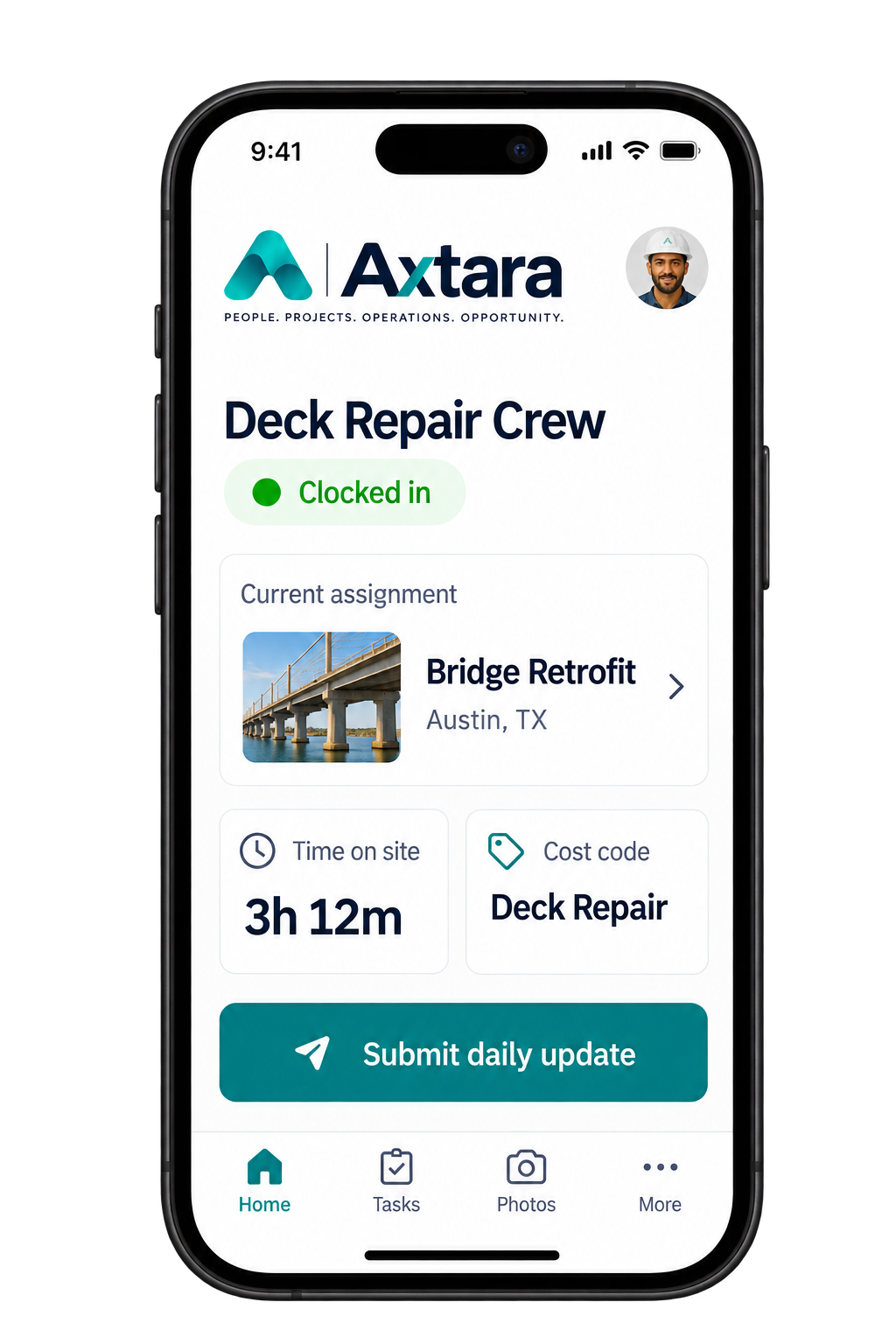
Time, assignments, daily updates and supporting evidence stay connected to the work on site.
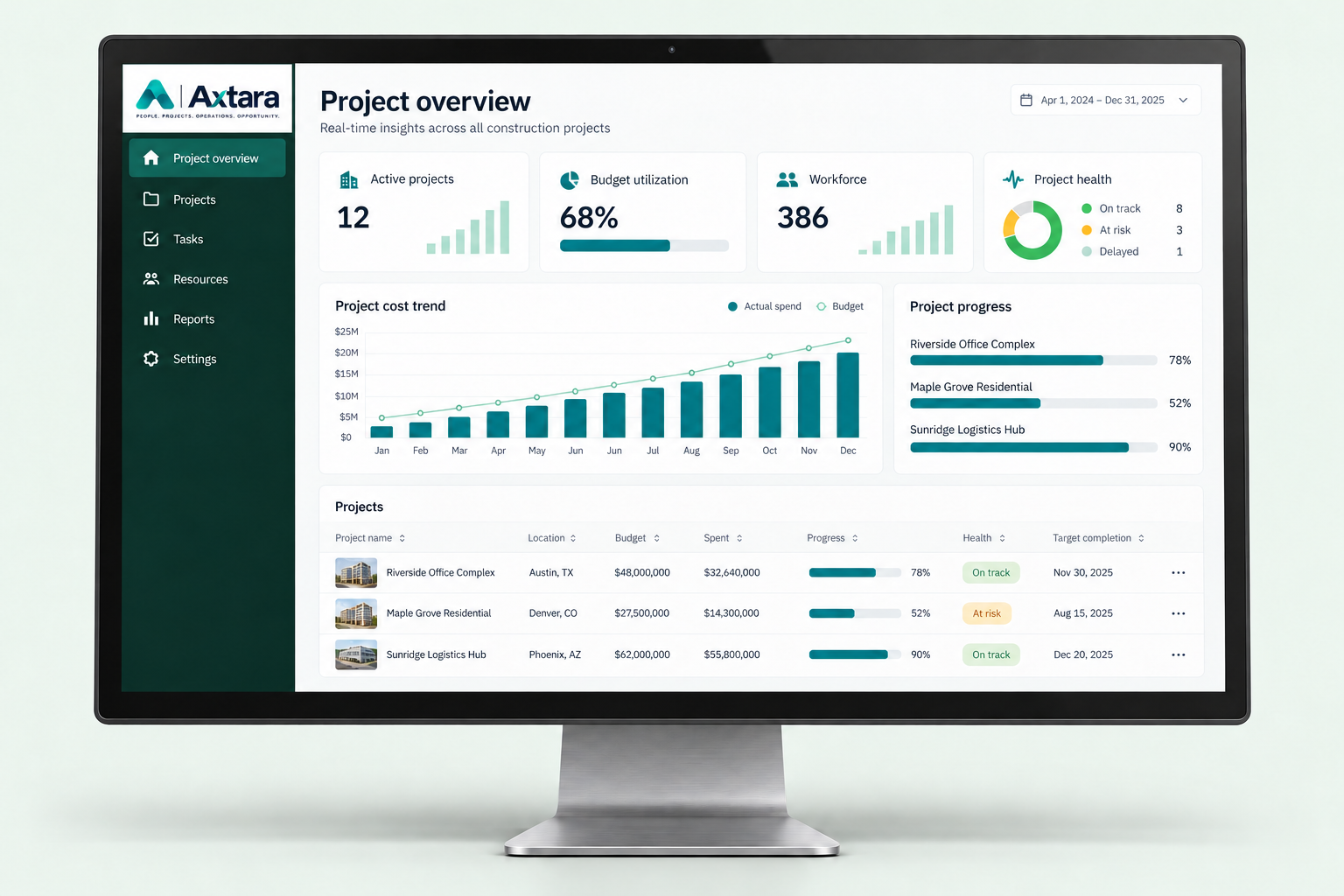
Axtara gives every active project one connected operating picture: crews assigned to sites and cost codes, time captured and approved in the field, budgets tracked against real labor cost, documents and certifications centralized and a management view that updates as work happens, not at month-end.
Captured in context. Reviewed by the right person. Visible to the teams that need it.
A 12-person crew is assigned to the Lekki–Epe Expressway Expansion, structural phase, under a named site supervisor.
Each worker clocks in at the site gate; geofencing confirms they are on site before time starts recording.
Hours are logged against the structural cost code, separating regular time from overtime automatically.
The supervisor files a daily update with progress notes and photo evidence of poured sections.
Two workers are flagged for approaching daily overtime limits before the shift ends, not after payroll runs.
The supervisor reviews and approves the crew’s attendance, exceptions and daily update in one pass.
Approved labor cost updates the structural cost code against its budget as it is approved.
The project health dashboard reflects updated cost, progress and the flagged overtime exception the same day.
Everyone works from the same operational picture, with access that reflects their role.
Explore the platformOne control desk for attendance, exceptions and daily field updates.
Cost-coded labor and budget consumption without waiting for finance to close the period.
Approved time becomes payroll-ready without re-keying timesheets.
A portfolio view across every active site, updated daily.
Approved progress evidence without exposure to payroll or HR data.
Cost-code variance is visible while a project is still in progress.
Verified, cost-coded time reduces reconciliation and disputed hours.
Drawings, permits and certifications live in one place, accessible from the field.
Executives see every active site without assembling a report by hand.
People, crews and assignments.
Explore solutionCaptured on site. Reviewed in context.
Explore solutionApproved activity, connected to cost.
Explore solutionProgress, costs and the project record.
Explore solutionReadiness, approvals and operational control.
Explore solutionThe operational picture leadership needs.
Explore solutionWe will walk through your project types, compliance requirements and reporting needs.